Never Manually Count Another Symbol
The AI symbol-takeoff tool for electrical estimators — on-prem or cloud, your call — the count you can defend.
Turn a 3-hour manual takeoff into a few minutes. SimplyCount finds and marks every symbol on your plan set — so you bid faster and stop burning nights on the highlighter.
SimplyCount doesn't replace your judgment — it does the tallying. You review and sign off on every number.
No credit card. Or book a pilot on your own plans →
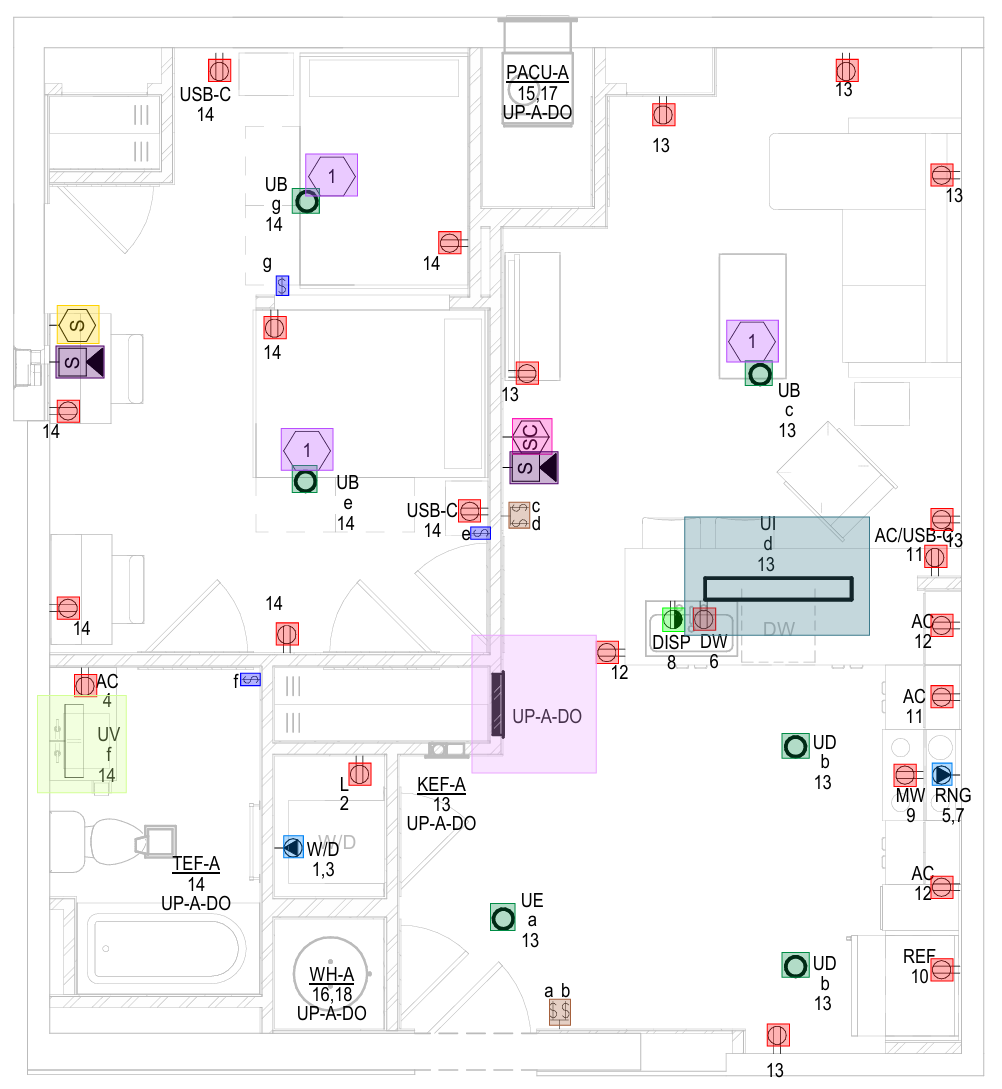
Drag the line. See every symbol get found.
This is a real electrical panel sheet. Slide to reveal what SimplyCount marks — receptacles, fixtures, switches — in the time it takes to read this sentence.
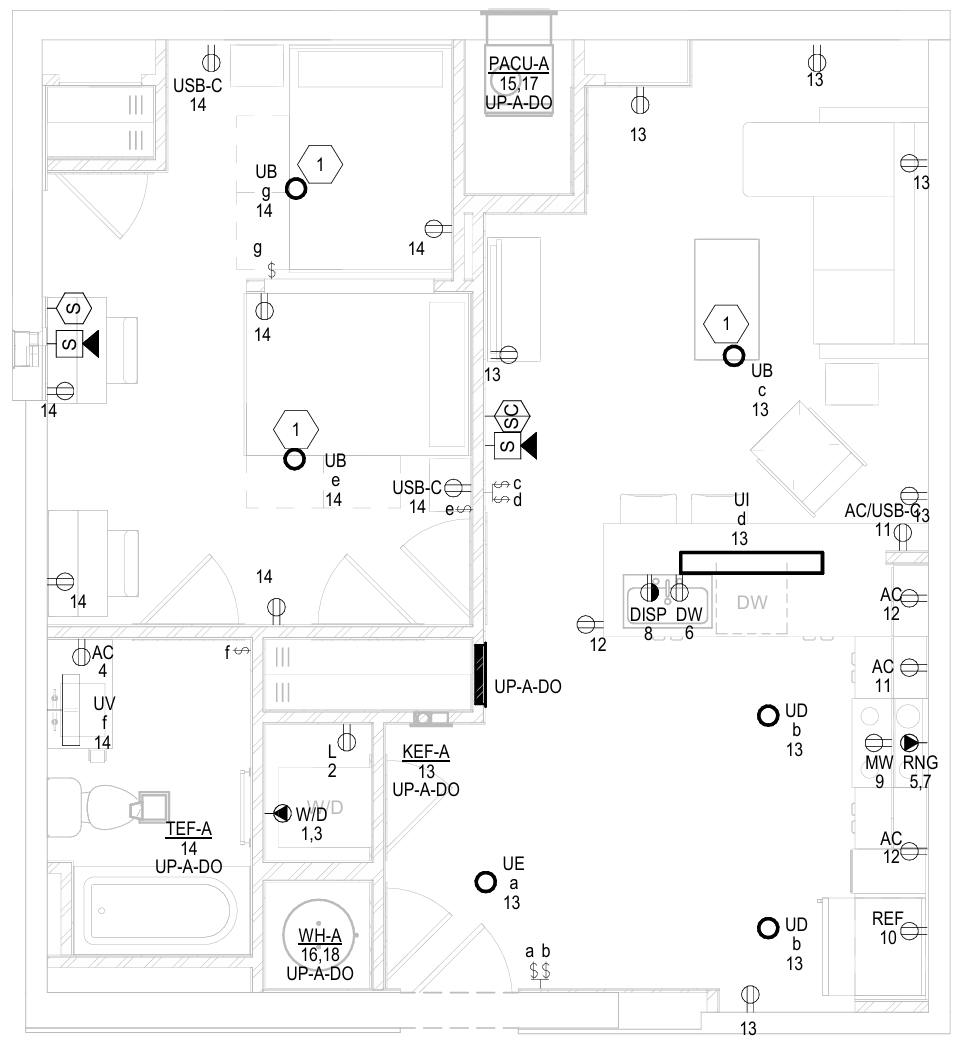
 Your plan
Counted
Every symbol on this sheet — found & marked
Your plan
Counted
Every symbol on this sheet — found & marked
You lose evenings tallying by hand. One miscount can sink a bid.
Counting symbols eats hours you don't have when a bid is due Friday.
A single missed or double-counted device turns a winning bid into a loss.
Inconsistent symbols and standards make hand counts hard to defend.
Fewer people want the tedious work — and turnover keeps costing you.
Productivity losses cost U.S. contractors an estimated $30–40B a year.*
Turn a 3-day takeoff into an afternoon — and bid more jobs than the firm across town, with the same crew.
Buried in plan sets, re-checking counts at 11pm, hoping you didn't miss a homerun.
Turn a bid around in an afternoon — and defend every number in the room.
Where we're headed: self-learning that compounds across your firm's whole symbol library, more trades and document types, and — eventually — a takeoff that counts itself.
Import → point at your symbols → review & export
Import your plans
Drop in your plan set as a PDF. Every sheet is ready to count.
Point at your symbols
Pick the symbols you need — the engine finds every instance, every sheet.
Review & export
Confirm the marked-up detections and export a defensible count.
Built for the estimator — not a generic AI demo
Finds every instance
The engine sweeps the whole plan set and marks every symbol — no highlighter, no tally sheet.
Defensible, uncapped counts
Real totals you can stand behind in a bid — never an estimate dressed up as a total.
Any plan — even a phone photo
Blueprints, P&IDs, scanned pages, even a photo of a drawing taken on your phone — grainy, cluttered, or rotated.
Compounds with every job
Every symbol you teach is saved for every future job — your library and your speed compound the more you count.
Offline or cloud — your call
Run it fully on-prem — no cloud required, encrypted local database, great for a locked-down or remote jobsite — or hosted in the cloud with nothing to install. Either way it exports to Excel, CSV & PDF.
Teach a symbol once
Save it and count it on every future job — almost no ramp-up for your team.
The count lands in your estimate — not another silo
Export a clean count to Excel, CSV or PDF and drop it straight into the estimating stack you already run.
Works alongside your tools via Excel/CSV export. (Direct integrations noted where they exist — we never claim one that doesn't.)
| Symbol | Description | Count | Sheet | Flag |
|---|---|---|---|---|
| ◐ | Duplex receptacle | 142 | E-201 | — |
| ⬡ | 2×4 lay-in fixture | 88 | E-201 | — |
| ▤ | Single-pole switch | ≥ 37 | E-202 | floor |
Example export. Unverified counts show as a floor (≥), never dressed up as a total.
Only one is fast, flexible, and yours to defend
- Hours per sheet
- One miscount sinks a bid
- Hard to defend a hand tally
- Force your drawings onto their servers — no on-prem option
- A percentage you can't defend
- No answer when IT says "keep it in-house"
- Minutes, not nights
- On-prem OR cloud — you choose where it runs
- A count you sign off on
Two ways to run SimplyCount — you pick
Most takeoff tools force everything through their cloud. SimplyCount doesn't. Same engine, same 168× benchmark, same count you sign off on — you just choose where it runs.
On-prem / offline
Installs on your machine, inside your firewall. Plans stay in an encrypted local database — nothing uploaded. Air-gap-capable: pull the network cable and it still counts. The easy yes for a strict security review. Best for sensitive plan sets and locked-down IT.
Hosted cloud
Nothing to install — sign in and start counting. Reach your projects from any machine, always on the latest version. We host and maintain it. Same review-and-sign-off count. Best for teams who want to be counting in minutes, from anywhere.
Same engine. Same human sign-off. Same defensible count. You just choose where it runs.
What is hand-counting costing you?
A transparent estimate from our real benchmark — 168 pages counted in about an hour. Change the numbers to your typical job.
Estimate only, scaled from the SimplyCount benchmark (60 symbols across 168 pages in ~1 hour). Your mileage varies with plan complexity.
The Electrical & Construction Symbol Legend + Takeoff QA Checklist
A reference every estimator can use — whether or not you ever open SimplyCount.
Download the PDF (no email)You sign off — not the model
The riskiest thing you do is put a number in a bid. Here's how SimplyCount keeps that number yours.
Human-in-the-loop
You review and confirm every detection before it leaves the app. The count that goes in your bid is the one you approved.
You choose where your drawings live
Pick on-prem/offline and your plans never leave your device — no Wi-Fi, no cloud, encrypted local database, inside your firewall. Or pick the hosted cloud and there's nothing to install. Your data, your deployment.
Honest totals, flagged
If a count isn't fully verified, SimplyCount shows it as a floor (≥), not a total — so nothing dressed-up ever lands in your bid.
Choose offline mode and pull your network cable — it still counts.
For IT & security
Deploy it your way. On-prem/offline: desktop install, plans processed locally in an encrypted local database, no outbound data, runs inside your firewall, air-gap-capable. Cloud: hosted, nothing to install, access anywhere. Forward this to whoever signs off on your tools.
Download the security & data-handling one-pager →Trusted by the people who put the number in the bid
“Stop counting by hand. Point at a symbol, review the marks, and bid with a number you can defend.”
Real estimator quotes, firm logos, and a numbers case study land here — the #1 thing that converts your peers. We only publish real ones.
Pilot SimplyCount on your own plans
We're partnering with a handful of electrical shops as founding firms: run it on a real bid, keep the time you save, and — only if you're happy — become one of the named case studies above. No commitment to publish.
Or skip the wait — Start Free now. No card.
Pricing, guarantee & support — nothing hidden behind a signup
Pricing
Start free — no credit card. Plan pricing is published here (operator sets the number) so you always know the cost before you sign up.
Guarantee
Try it on your own plans free, cancel anytime, no card — and if you run on-prem, your data never leaves your machine.
No learning curve
If you can use a highlighter, you can use SimplyCount. Import, point, review, export.
The things estimators ask first
What files does it take? Only electrical plans?
What if it misses a symbol — or double-counts?
Can it learn my custom or non-standard symbols?
Where does my plan data live? Is it private?
Can we keep everything inside our network?
Can we run it fully air-gapped / inside our firewall?
Can I get the counts into Excel?
How fast is it, really?
What does it cost?
Never manually count another symbol
Start free — run your first plan and see a number you can defend. 168 pages · 60 symbols · ~1 hour.
No credit card · On-prem or cloud — your choice